Bot Detection Default Configuration
Everything on this page comes with the crowdsecurity/appsec-bot-challenge collection installed in Enable bot detection.
The two appsec-configs it installs
Scoring and rejection are split across two configs:
appsec-bot-challenge-scoringserves the challenge and scores the submission. It never rejects.appsec-bot-challenge-scoring-balancedrejects submissions that score 75 or more.
Because they are separate, you can add or re-weight signals in a config of your own without touching the shipped ones. See Customization & recipes.
How a request is scored
Every signal that fires adds points, so two moderate signals can cross a threshold that neither would reach alone.
Signals are added over time, so this table may differ from what your version ships. Treat it as examples.
The built-in signals carry these weights:
| Points | Signals | Why this weight |
|---|---|---|
| 100 | cdp, webdriver, webdriver_writable, selenium, playwright, webdriver_iframe, webdriver_worker, bot_user_agent | An automation framework is driving the browser, or the client declares itself a bot in its User-Agent. A real visitor never shows these. |
| 50 | headless_screen_resolution, missing_chrome_object, impossible_memory, inconsistent_etsl, mismatch_webgl_worker, mismatch_platform_iframe, mismatch_platform_worker | Headless environments and cross-context inconsistencies. Strong evidence, but a few real clients trigger each one. |
| 30 | platform_mismatch, gpu_mismatch, high_cpu_count | Suspicious, but VMs and remote desktops trigger them too. |
| 15 | utc_timezone, ua_mobile, accept_language | Common among real visitors. Servers, VPNs and privacy tooling all produce a UTC timezone. |
| 5 | swiftshader_renderer, mismatch_languages, timezone_country | Only meaningful in aggregate. timezone_country fires on any traveler or VPN user. |
A headless Chrome driven over CDP in a UTC container scores cdp=100 plus utc_timezone=15, so 115, over every threshold the collection ships.
Detection configs from the hub add more signals, described in Signals.
Choose a threshold
Three bundles ship the same scoring engine and exclusions, and differ only in where they reject:
| Collection | Rejects at | Use when |
|---|---|---|
crowdsecurity/appsec-bot-challenge | >= 75 | The default. Catches automation frameworks and headless browsers without acting on weak signals. |
crowdsecurity/appsec-bot-challenge-strict | >= 45 | You would rather turn away a few real visitors than let a bot through. |
crowdsecurity/appsec-bot-challenge-permissive | >= 100 | You only want to block near-certain automation. |
Install exactly one. To change strictness, install a different one: editing a hub config marks it tainted and stops its updates.
They are also built from reusable collections, if you want to compose your own bundle:
| Collection | Contains |
|---|---|
crowdsecurity/appsec-bot-challenge-scoring | The scoring config, without a threshold |
crowdsecurity/appsec-bot-challenge-detections | Detection configs that add signals |
crowdsecurity/appsec-bot-challenge-good-bots | The verified-bot exclusion configs |
crowdsecurity/appsec-bot-challenge-exclude-paths | The path exclusion configs |
The alerts it produces
A submission over the threshold is refused its cookie. The log line records the score in reason and the signals that fired in signals.
Bot detection raises three kinds of alert:
| Aspect | Rejected submission | Flagged submission | Behavioral scenario |
|---|---|---|---|
| Verdict | Rejected alert, no ban | Accepted, flagged alert, no ban | IP blocked |
| Scenario | crowdsecurity/rejected-browser-submission | crowdsecurity/suspicious-browser-submission | crowdsecurity/appsec-bot-challenge-too-many-* |
| Client | Refused its cookie | Keeps its cookie | Blocked at the bouncer |
| Kind | bot-detection | bot-detection | crowdsec |
| Fires | Once per rejected submission | Once per flagged submission | Once an IP crosses a rate over time |
| Answers | Why was this client refused? | Is a new signal firing on your traffic? | Which IP is worth blocking? |
A submission is flagged when it is accepted but a hook calls FlagSubmission(). The shipped appsec-bot-challenge-warn-experimental does this whenever an experimental signal fires.
Both per-submission scenarios use the bot-detection kind, so cscli alerts list --kind bot-detection lists them apart from your WAF and log-based alerts.
Read a rejection
The collection ships the crowdsecurity/appsec-bot-detection alert context. Inspect an alert with cscli alerts inspect ALERT_ID -d, replacing ALERT_ID with an ID from cscli alerts list, and read score_reasons, the per-signal breakdown. A decisive cdp=100 is a bot. Weak signals that barely reach the threshold usually mean it is too low for your traffic.
fingerprint_id (the fsid) is stable per device profile, so a scraper rotating addresses keeps the same fsid. cscli bot fsid decodes it.
The same context in the Console:
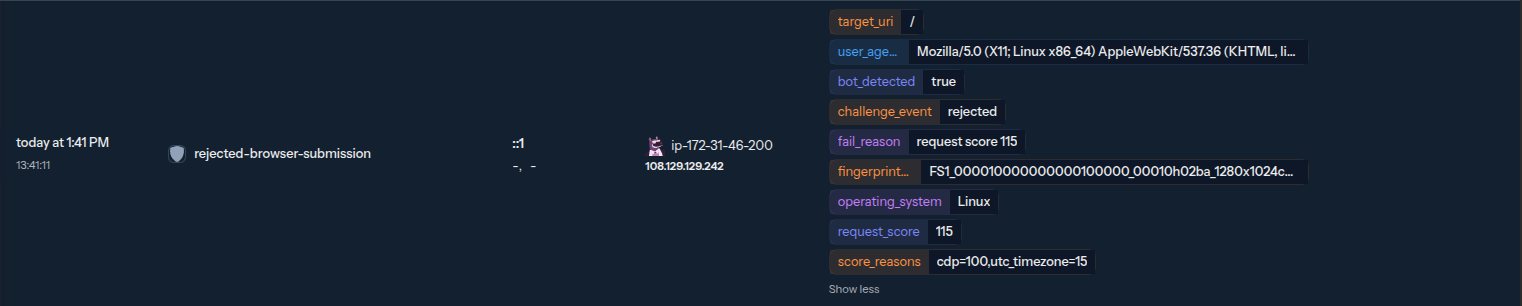
The event carries more fields than the shipped context shows. See Event fields for alert context.
Behavioral scenarios it installs
Two scenarios look across requests and block repeat offenders:
| Scenario | Type | What it catches | Outcome |
|---|---|---|---|
crowdsecurity/appsec-bot-challenge-too-many-requests | leaky | An IP is served the challenge page repeatedly but never submits it. | Block |
crowdsecurity/appsec-bot-challenge-too-many-submissions | leaky | An IP submits the challenge many times, typical of an automated solver or a script brute-forcing the fingerprint. | Block |
Known bots it lets through
Search-engine crawlers, uptime probes and AI crawlers never solve a JavaScript challenge, and blocking them costs you indexing and monitoring, so the collection exempts them.
To be exempted, a client's IP must belong to the vendor's published ranges or pass a forward-confirmed reverse-DNS lookup. A bot claiming to be Googlebot from an address that isn't Google's is challenged like any other client.
The families are split across separate configs so you can install only the ones you need:
| Appsec-config | Bots it verifies |
|---|---|
crowdsecurity/appsec-bot-challenge-exclude-search-engines | Search-engine crawlers |
crowdsecurity/appsec-bot-challenge-exclude-ai-crawlers | AI crawlers and assistant user-agents |
crowdsecurity/appsec-bot-challenge-exclude-google-ads | Google advertising crawlers |
crowdsecurity/appsec-bot-challenge-exclude-wikimedia-citation | Wikimedia citation and reference-fetching services |
crowdsecurity/appsec-bot-challenge-exclude-social | Social-network link unfurlers |
crowdsecurity/appsec-bot-challenge-exclude-monitoring | Uptime and monitoring probes |
Each config's hub page lists the bots it covers. cscli bot match checks whether a given client would be exempted. To add a bot of your own, see Authoring your own known-bot files.
Path-exclusion configs
These configs exempt routes rather than clients. Crawler metadata, feeds, third-party webhooks, static assets and API endpoints are hit by clients that never run JavaScript, so challenging them only produces false positives. Each config covers one family of paths:
| Appsec-config | Exempts |
|---|---|
crowdsecurity/appsec-bot-challenge-exclude-crawler-files | /robots.txt, /.well-known/*, /security.txt, /sitemap.xml, /ads.txt, … |
crowdsecurity/appsec-bot-challenge-exclude-feeds | RSS/Atom feed paths (/feed, /rss, /atom.xml, …) |
crowdsecurity/appsec-bot-challenge-exclude-webhooks | /webhooks/* |
crowdsecurity/appsec-bot-challenge-exclude-static | static assets and media (.css, .js, images, fonts, /manifest.json, …) |
crowdsecurity/appsec-bot-challenge-exclude-api | programmatic endpoints (/api/*, /graphql, /wp-json/*, /oauth/*, …) |
Each is a separate config, so you can drop any that doesn't apply to your app. Enable bot detection shows how to load them from your acquisition. To add your own exclusions, ship a custom appsec-config rather than editing these.
For the request flow end to end and the device data the challenge collects, see How it works.